
How To Book Classes Using Your Yoga Package
Congratulations on booking your Monday Yoga Inner Circle Silver or Gold package! I am so happy to welcome you here.
Please find some useful information below on what to do next :
Step 1 : Register your account
Once you’ve paid for your package, you will be given an option to register your account. Please do so!
Step 2 : Book in the class dates you want to attend
There are 3 easy ways to book in the class dates you want to attend :
Option 1 : Using the Acuity Scheduling Client App
Download the mobile app by scanning the QR code displayed (you will be given this option after your payment has been completed).
This is the easiest way to book and reschedule your classes, and view all your package information (e.g. how many classes you have left to book, when your package expires etc).
Option 2 : Using A Web Browser
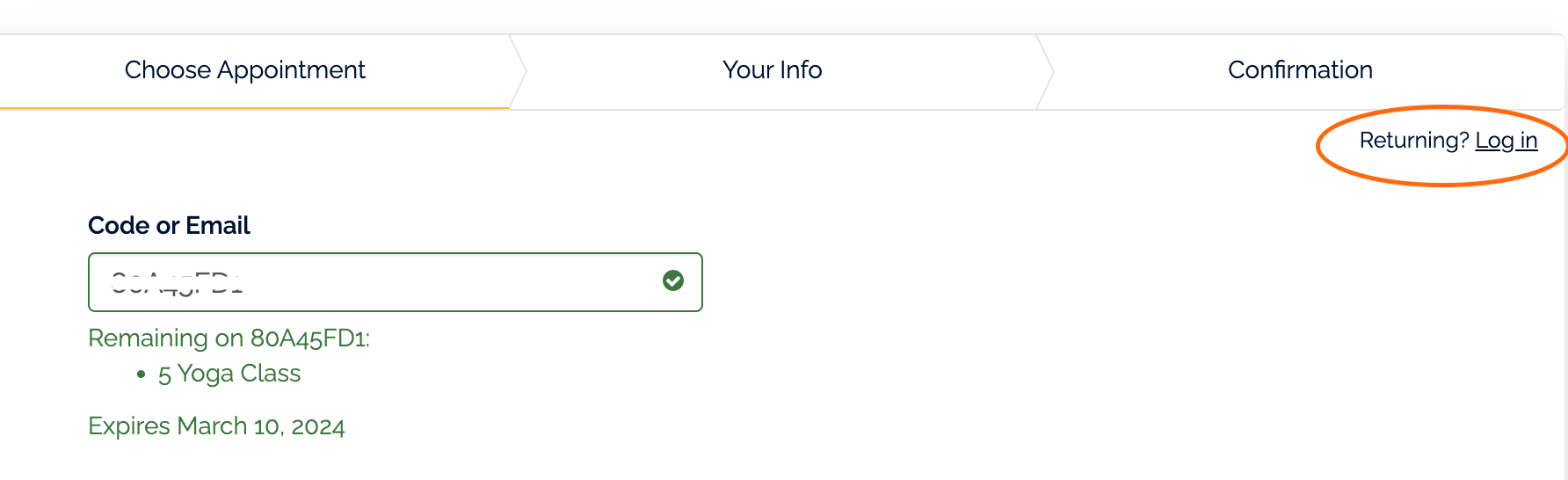
Click on the button below and first select ‘log in’ on the top right hand corner.
Enter the email address and password you used when you registered your account, and then book in all the class dates you want to attend via my calendar.
Click ‘Enter Your Booking Code’ when prompted and it should automatically fill it in for you.
Option 3 : Using the Email Confirmation Receipt
If you don’t want to download the the app, you can also easily book classes by clicking the word ‘schedule’ on the email receipt you were sent when you booked your package.
Please make sure you have logged into your account before you book in the classes in by clicking on the log-in button on the top right corner (circled in orange on the screenshot below).
How To Reschedule A Class
If you can no longer make a class that you had booked, you can reschedule the class up to 8 hours before the class start time.
Simply use the mobile app to reschedule the class, or find the email confirmation for the class and click on the yellow button that gives you the option to reschedule the class.
Any Questions?
If there’s anything you’re unsure about please email me at info@yogawithsheena.com and I will be happy to help you out!